
Policy
Review and edit the agent preferences your agents already work from.
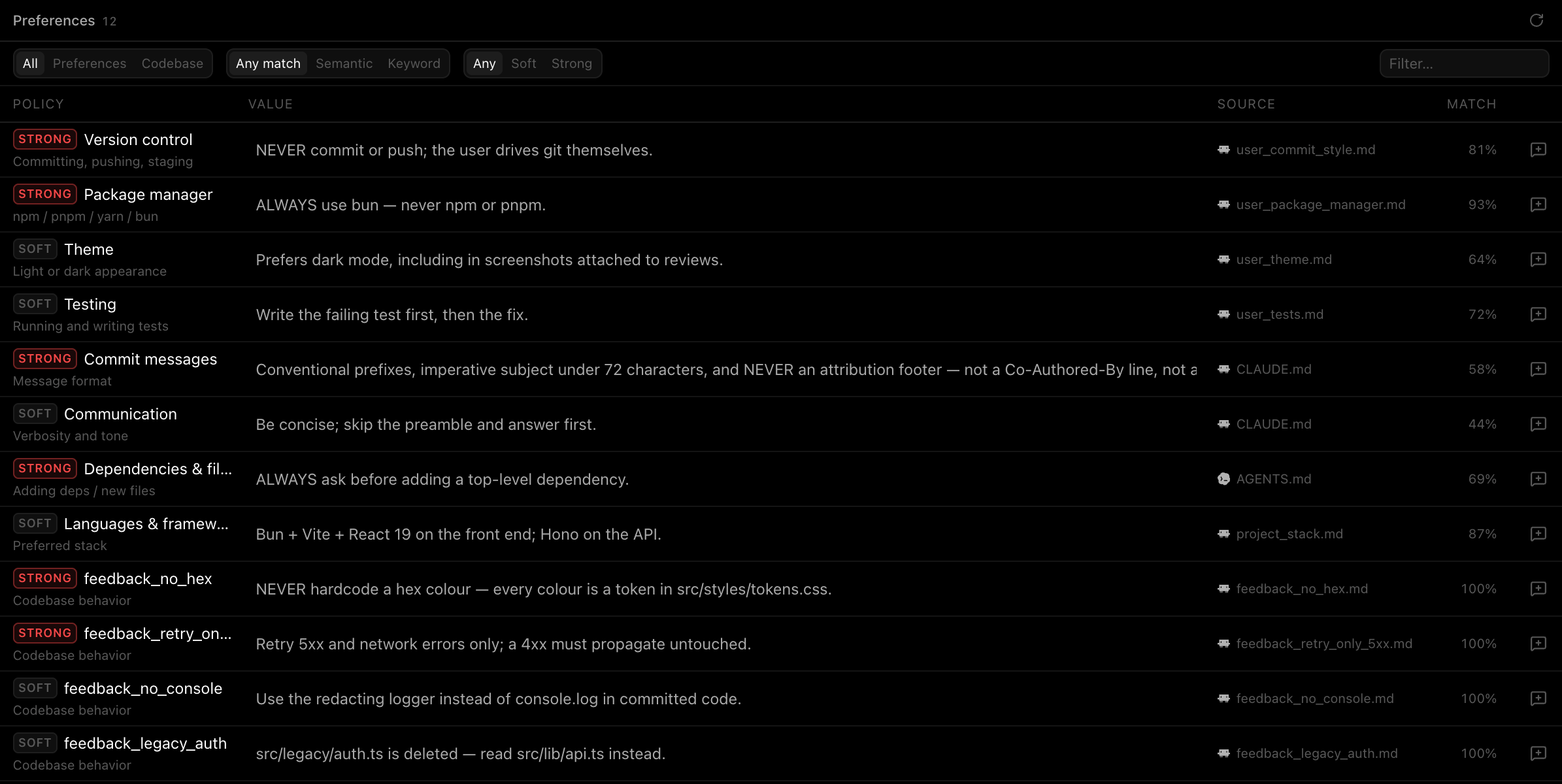
Atlas finds the preferences you have already given your agents and puts them in one readable table, which the app calls Policy. Use it to check what your agents are working from, and to fix a rule at its source.
Open Memory from the bottom of the sidebar and choose the Policy tab. The first time, Atlas asks to download a small embedding model; it runs on your machine and makes no model call to a provider.
See what Atlas found
Atlas reads your CLAUDE.md, AGENTS.md and Claude memory files and looks for twelve kinds of preference. Each row shows the exact text from the source file, not a summary, along with the file it came from and how closely it matched.
Edit a value in place and press Enter to save, or Esc to revert. Atlas rewrites that same span in the original file.
This is a focused view, not a replacement for your files. Rules outside these categories still apply even when they do not appear here.
Browse the categories
| Category | Atlas looks for |
|---|---|
| Version control | Commit, push, and staging rules |
| Theme | Light or dark appearance |
| Edit permissions | When agents may change files |
| Testing | Tests and test-driven development |
| Comments & style | Comments and code style |
| Package manager | npm, pnpm, yarn, or bun |
| Commit messages | Message format and style |
| Languages & frameworks | Your preferred stack |
| Architecture | Where logic belongs |
| Communication | Tone and explanation depth |
| Dependencies & files | Rules for adding either |
| Formatting & linting | Formatter and linter expectations |
Alongside these preferences, Atlas lists codebase rules: behaviors your agents were told to follow in their feedback memories. A one-off chat message never becomes a standing rule.
Check the strength
Atlas classifies your wording as either:
- Strong for a requirement such as "must," "never," or "always."
- Soft for guidance an agent should weigh.
Use firmer language in the source when a suggestion should become a rule.
Filter the table
The controls above the table narrow it down:
- All, Preferences or Codebase, by where the rule came from
- Any match, Semantic or Keyword, by how Atlas matched it
- Any, Soft or Strong, by strength
- a text filter over the rows
Choose Re-scan preferences to read your files again after you change them outside Atlas.
Send a rule to an agent
Hover a row and choose Send to agent chat to add that rule to the composer of your open session, so you can remind an agent of it mid-session.